
The Reown Dashboard is your single place to report bugs, share feedback, send us a message, and get help resolving issues with our AI-powered support.
How to Report an Issue#
Follow these steps to get in touch with our support team:
Step 1 - Log in to the Reown Dashboard#
Go to dashboard.reown.com and log in with your account.
Step 2 - Open the Help Center#
Once logged in, click the chat bubble in the bottom-right corner of the page, or choose Report a bug from the Help Center sidebar.

Step 3 - Choose an Option#
From the help desk modal, select the option that best fits your needs:
- Send us a message - Reach out directly to our support team.
- Create a ticket / Report an issue - File a bug report or request assistance with a technical problem.
- Check our docs - Browse through our documentation for answers.
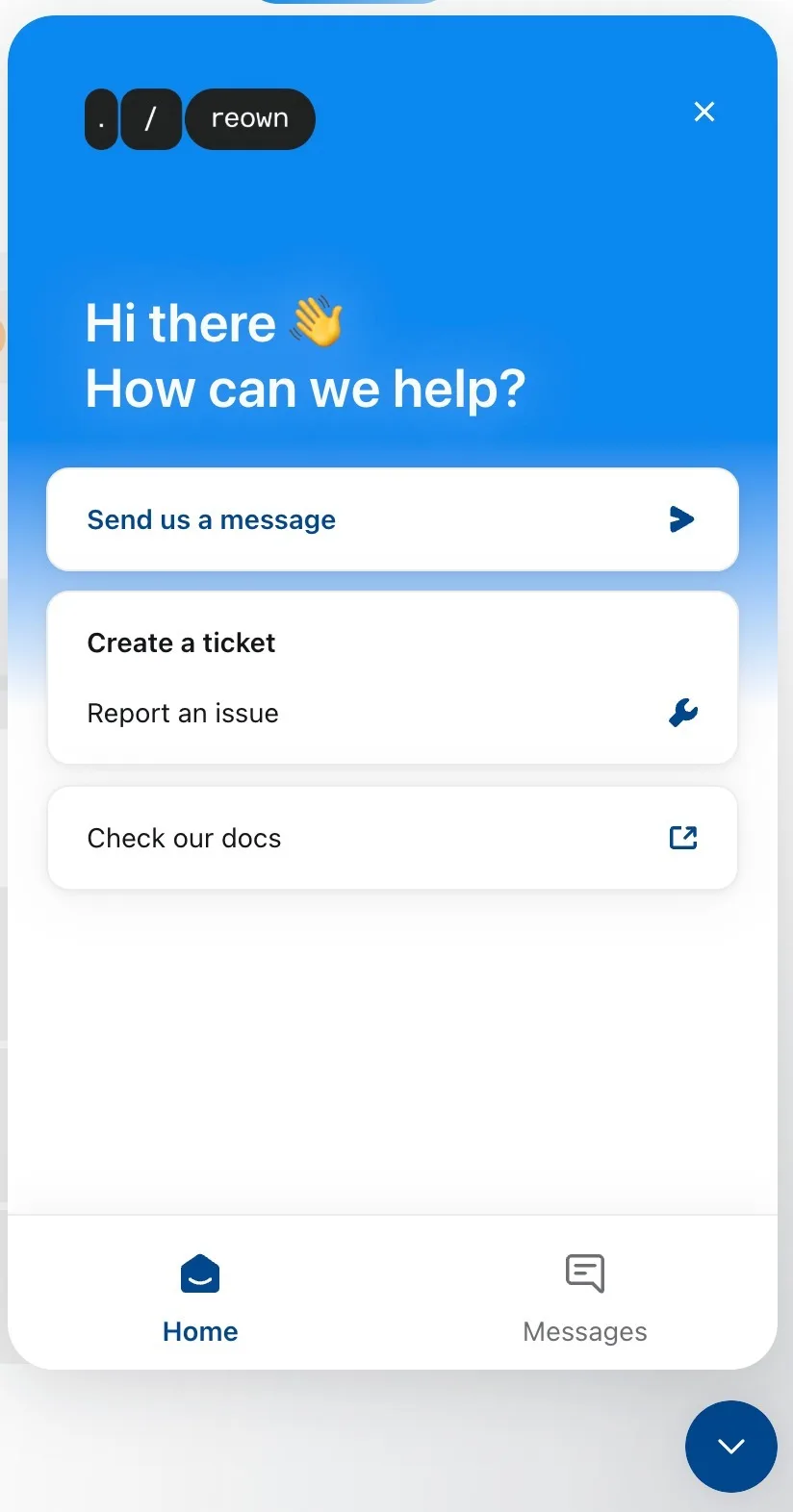
Our team will review your submission and get back to you as soon as possible.
Support Response Times#
Depending on your plan, you can expect different levels of support:
Upgrade Your Plan#
Want faster response times and dedicated support? You can upgrade your plan directly from the Reown Dashboard:
- Log in to dashboard.reown.com
- Click the "Upgrade Now" button in the top right-hand corner
- Choose Pro or Enterprise depending on your needs
For a full comparison of all plans and pricing, visit reown.com/pricing.